Most systems are built around “defined processes.”
The problem? Most organisations are still figuring those processes out as they grow.
We had this exact situation with a client recently – and so we designed a solution for change rather than certainty.
One of the trickier situations in a greenfield Dynamics 365 implementation is when a client knows they want structure, but can’t fully describe what that structure looks like. They’re not being evasive – it’s just that until a system exists, it’s genuinely hard to articulate how you’ll use it.
That was the situation we found ourselves in on a recent project. The client manages a significant volume of enquiries across multiple business areas. Some parts of their organisation used ServiceNow to manage workloads – where raising a specific type of request would automatically generate a standard checklist of tasks. They liked that idea. They wanted the same kind of consistency in their new Dynamics 365 solution. The challenge was that they couldn’t tell us exactly what those tasks were yet.
The obvious answer, and why we didn’t go with it
The natural instinct when you hear “repeatable process” in a D365 context is to reach for a Business Process Flow. A Business Process Flow (BPF) is a guided stage-by-stage workflow that sits across the top of a record and walks users through the steps to complete it. They’re powerful, and they were already part of our design.
But building a separate Business Process Flow for every type of enquiry – and every sub-type – would have been a problem. Every time the client wanted to add a new process, or change an existing one, they’d need a developer. For an organisation that was still figuring out how they’d use the system, locking them into that model felt like the wrong call.
We kept the Business Process Flow minimal – it captures the stages that are mandatory for every engagement regardless of type. What to do within those stages, and how that varies by the type of enquiry, needed a different mechanism.
The insight: use the classification to drive the activities
The solution came out of a client meeting where we were discussing how to classify enquiries. The team already needed a way to tag what type of enquiry they were dealing with – not just the broad category, but a more specific subcategory. “System Access / Role Change” rather than just “Procurement”, for example.
I proposed that we use that subcategory field as the trigger. If you know the type of enquiry, you know the standard activities that should go with it. Instead of hardcoding those into a process flow, we’d build a template record that described each activity – and the system would create them automatically when the enquiry moved into the active stage.
That became the Activity Template.
What an Activity Template actually does
An Activity Template is a configuration record in the CRM. It defines a single activity – a task, a draft email, or a meeting request – and links it to a subcategory. You can create as many templates as you need for each subcategory, and they’ll all trigger together when an engagement moves to In Progress.
Each template lets you specify:
- What type of activity to create (task, draft email, or meeting request)
- What it should be called – this becomes the subject
- Who it should be assigned to – the person who owns the engagement, a specific named user, or a team
- When it’s due – expressed as a number of days from the date the engagement was created, with separate offsets for urgent, high, normal, and low priority engagements
That last point is worth pausing on. If a “First contact” task should be done the same day for an urgent enquiry but within three days for a normal priority one, you set those separately on the same template. Not every activity need apply to each priority, if it doesn’t apply, you leave that offset blank and no activity is created for those cases.
The screenshot below shows what a template record looks like in practice – this one creates a “VP Access Manager Approval” task, assigned to the engagement owner, due one day after creation regardless of priority.
For draft emails, you can also link a D365 email template to pre-populate the subject and body. The email is pre-addressed to the primary contact on the engagement and sent from the team’s shared mailbox – ready for review and sending, not fired off automatically.
What happens when the engagement moves to In Progress
Using automation, when a user advances an engagement through the Business Process Flow to the In Progress stage, the system looks up all active templates for that engagement’s subcategory and creates the matching activities automatically. They land in the engagement timeline, assigned and dated, so the team can see exactly what’s been generated and who’s responsible for each item.
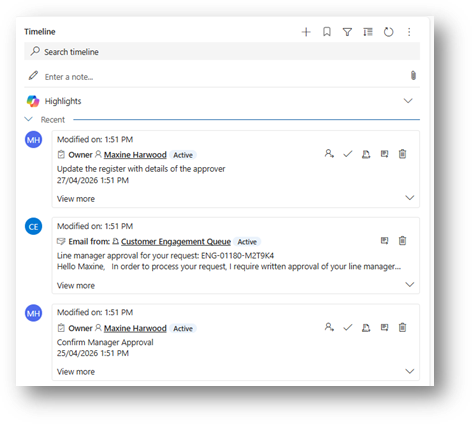
If an engagement gets moved back and then advanced again – which does happen – the system checks for duplicates and won’t recreate activities that are already there.
The part that matters most to the business
Here’s the thing that I think makes this worth writing about. Configuring an Activity Template doesn’t require a developer or a system administrator in the traditional IT sense. It’s a record in the CRM. Anyone with the right access level – which could reasonably sit with a team manager or coordinator – can create, edit, or deactivate activity templates. Add a new step to a process, change who a task gets assigned to, retire an activity that’s no longer relevant – all of that happens in the interface, not in a configuration file or a flow editor.
For a client who isn’t sure yet what their processes will look like at go-live, it means the system can grow with them. The templates they set up on day one don’t have to be perfect, because changing them later isn’t a project, it’s a five-minute task.
Is this the right pattern for every D365 implementation?
Probably not. If you have a small number of well-defined engagement types and your processes are stable, a Business Process Flow with embedded steps might be the best option. But if your client is starting out uncertain, managing a high variety of enquiry types, or genuinely wants to own their own process configuration over time – this pattern is worth considering.
It sits in that useful space between “fully manual” and “locked-down automation” – structured enough to ensure consistency, flexible enough to be maintained by the people closest to the work.
Interested to know more about Activity Templates? Get in touch info@mojosoup.com.au