

By John Bordin
It’s a late evening at CityLife General Hospital’s bustling emergency room. Receptionist Jenny is wrapping up her shift when a man named Mike rushes in, clutching his right hand that he accidentally cut while cooking dinner. Mike needs immediate attention, and Jenny must initiate the admission process.
CityLife General Hospital recently transformed their patient admission process using Power Apps to handle these kinds of emergencies.
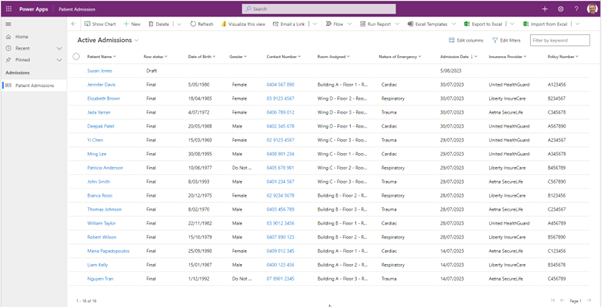
As soon as Jenny enters Mike’s name, date of birth, and the nature of his injury, she sets the record’s status to ‘Draft’ and saves it. The system is designed in such a way that only the critical fields are ‘Business Required’ at this stage. This enables the staff to focus on immediate care.
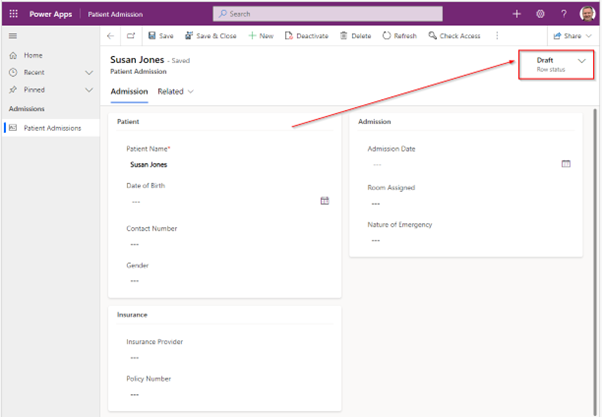
Now let’s take a step back and delve into the behind-the-scenes workings of this Model-driven Power App.
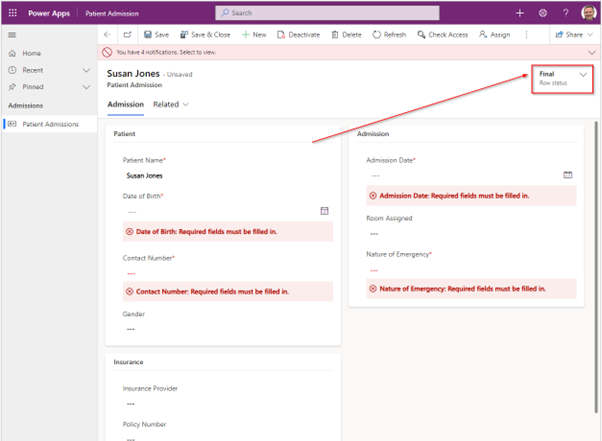
For such a complex form with many fields, an immediate requirement for all fields to be filled in would be impractical. Thus, the app is designed to adjust the mandatory requirement of fields based on the status of the row. We primarily implemented this using GUI-based Business Rules, an intuitive feature in Power Apps that allows for dynamic changing of field requirements.
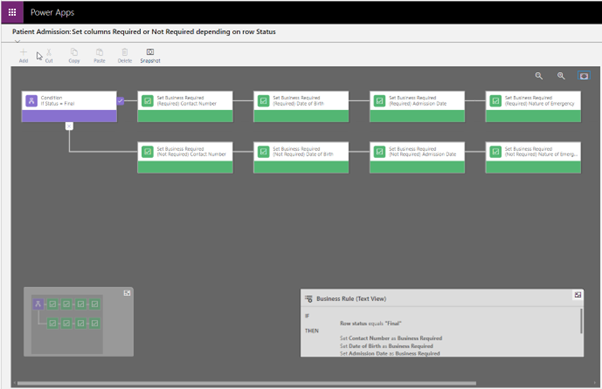
In the ‘Business Rule’ configuration, a condition checks the value of the ‘Record Status’. When the status is ‘Final’, important fields are made ‘Business Required’. Conversely, in the ‘Draft’ status, these fields are set to ‘Not Business Required’. This straightforward, easy-to-maintain approach offered us the flexibility we needed.
Business Rule (Text View)
IF

  Row status equals "Final"

THEN

  Set Contact Number as Business Required

  Set Date of Birth as Business Required

  Set Admission Date as Business Required

  Set Nature of Emergency as Business Required

ELSE

  Set Contact Number as Not Business Required

  Set Date of Birth as Not Business Required

  Set Admission Date as Not Business Required

  Set Nature of Emergency as Not Business Required
Business Rule (GUI View)
Alternatively, JavaScript could also be used to achieve a similar result. A function that gets called on the ‘OnLoad’ events of the form and the ‘OnChange’ event of the <Row status> field could be created. This function would use the formContext.getAttribute(<field name>).setRequiredLevel(“required”) method to make the important fields required when the status is ‘Final’, and formContext.getAttribute(<field name>).setRequiredLevel(“none”) when it’s ‘Draft’. This method provides more control and flexibility, allowing for more complex conditions or behaviours if necessary.
JavaScript code for the business logic
function requiredFields(executionContext) {
  var requiredLevel;

  var formContext = executionContext.getFormContext();

  if (
    formContext.data.entity.attributes.get('statuscode').getText() === 'Final'
  ) {
    requiredLevel = 'required';
  } else {
    requiredLevel = 'none';
  }

  formContext
    .getAttribute('cr1e8_contactnumber')
    .setRequiredLevel(requiredLevel);

  formContext.getAttribute('cr1e8_dateofbirth').setRequiredLevel(requiredLevel);

  formContext
    .getAttribute('cr1e8_admissiondate')
    .setRequiredLevel(requiredLevel);

  formContext
    .getAttribute('cr1e8_natureofemergency')
    .setRequiredLevel(requiredLevel);
}

function formOnLoad(executionContext) {
  requiredFields(executionContext);
}

function rowStatusOnChange(executionContext) {
  requiredFields(executionContext);
}
One solution to reflect important fields we decided against was the Business Process Flow. Despite its flexibility, we found it limiting that required columns only show in the fly-out of the Business Process Flow and not in the form itself, leading to a less than optimal user experience.
As Mike’s treatment at CityLife General Hospital progresses over the next few days, Jenny and her colleagues fill out the remaining fields in the form: insurance details, medical history, diagnosis, treatment plan, and patient notes. Once all the required fields are filled, and Mike’s treatment plan is ready, Jenny changes the ‘Record Status’ to ‘Final’. The business rules trigger and enforce that all critical fields are now ‘Business Required’. This system ensures that the record is thorough and complete before it’s submitted for final approval.
The dynamic, flexible system developed using Power Apps has greatly improved patient care at CityLife General Hospital. By focusing on the essential requirements at the right times, it ensures that crucial information is not missed while also providing flexibility during emergencies. The Power App has become a true ally in patient care, ensuring that the team can focus on providing care when it matters most.